A deep audit on your Amazon fees. Free to run. Paid only from what it finds.
Read-only access, revocable in two clicks, results within two weeks. If we find nothing, you pay nothing — we delete the data we pulled and show you how to disconnect us.
About two minutes · read-only · you can revoke it yourself at any time
What this is
The layer under the standard sweeps
There is a whole industry that chases Amazon reimbursements — lost inventory, damaged stock, refunds that never came back. If you use one of those services, keep it. We don't duplicate what they do.
We audit the layer underneath: the fees themselves, line by line, against what Amazon should actually have charged for your products, your sizes, your marketplaces. Errors there don't announce themselves — they sit inside numbers that look normal, and they compound monthly. Recent client audits have surfaced five-figure findings. A single correction on our own account is saving about £30k a year. And on some accounts we find nothing at all — that answer is free too, and it's a real answer: checked, not guessed.
Amazon sometimes overcharges. They don't mean to.
What Amazon actually charged you is a different number from what the rate card says it should have been, and the two disagree more often than anyone expects. There are a great many moving parts to Amazon's fees, and the hiccups on their side are quiet ones: nothing announces itself, nothing looks wrong on the surface, and the figures all add up until you know exactly where to look. The money leaks on every single order, and it compounds.
We dig deep and find the buried treasure. Then we take it from there: we handle Amazon's support ourselves, case by case, all the way through to reimbursement — and we keep watch afterwards, so the same leak doesn't quietly reopen.
The deal
How it works
- You connect, read-only. The button above takes you to Amazon's own consent screen. Two minutes, no development, no spreadsheet exports.
- We audit, free. Within two weeks you get one of two answers: "nothing — and here's how to disconnect us", or a figure.
- If there's a figure, you decide. Want it chased? We handle every case and negotiation with Amazon ourselves. Our fee is 30% of what is recovered as a result of our findings, plus 25% of the first eighteen months of savings where a fee is corrected going forward — invoiced quarterly, in arrears, by S9Search Ltd. No finding, no fee, ever.
One honest note on timing: the audit looks back over at least the last twelve months of fee-level detail, but some of Amazon's own claim windows are much shorter — inbound shipment claims, for example, close around nine months after the shipment. Waiting doesn't make anything safer; it just lets claims expire quietly.
Access
Exactly what we can see — and what we can't
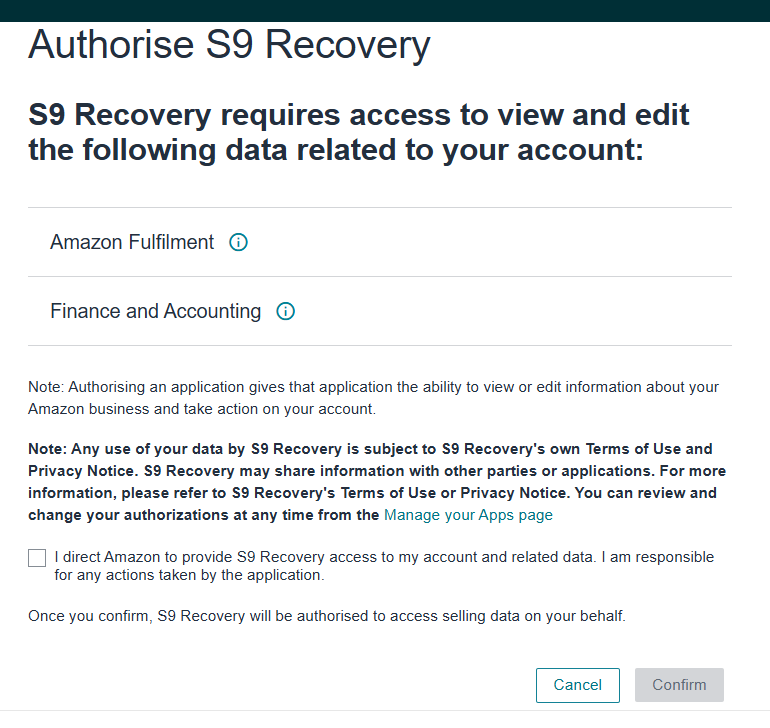
The audit uses a dedicated, minimal Amazon SP-API application called S9 Recovery. It requests exactly two permission groups, both of which are reporting data:
- Finance & Accounting — your settlement and fee data: what Amazon actually charged.
- Amazon Fulfilment — FBA fee, inventory and shipment reports, including Amazon's own fee estimates per product.
It cannot change anything on your account: no price changes, no listing edits, no feeds, no advertising access, and no buyer personal data. The permission list you see on Amazon's consent screen is the whole of it.
One thing about that consent screen: Amazon heads it with the same boilerplate for every application — "requires access to view and edit the following data". That sentence is Amazon's template, shown whatever an app requests. What varies is the permission list under it, and ours is the two reporting groups above.
Revoking us takes two clicks
Seller Central → Apps & services → Manage your apps → find S9 Recovery → Disable. That ends our access instantly, whenever you choose, no need to tell us (though we'll likely notice). If you later engage us to run cases and invite a user to your account, removing that user is the same two clicks under Settings → User permissions.
Your data
What happens to the data we pull
If we find nothing, we tell you so, delete the data we pulled, and drop the stored connection at our end — the email you get includes the revocation steps above so nothing of ours is left attached to your account. If we find something and you engage us, we keep the working data only for as long as the engagement runs, then the same deletion applies.
What we retain afterwards: genuinely aggregated, non-identifiable statistics only — the kind of line that reads "recent audits surfaced five-figure findings". Never your name, your products, or anything identifiable.
Who
Who's behind this
I'm Jonathan Saunders. I run the analytics for a brand selling on six Amazon marketplaces, and fee anomalies are something of a specialism — most of what we check for was found the expensive way, on our own account, before it became a checklist. S9 also builds seller data warehouses and analytics; the audit is the same machinery pointed at your fees.
Questions
FAQ
- Do I need to leave my current reimbursement service?
- No. Keep it. We deliberately don't duplicate the standard sweeps — where you already have a service filing those, we leave that whole class alone, so there's no double-filing and no double invoicing.
- What does the audit cost if you find nothing?
- Nothing. No setup fee, no audit fee, no minimum. We delete the data and show you how to disconnect us. The free look is genuinely free — it's how we earn the right to the percentage when there is something.
- How is the 25% of "ongoing savings" measured?
- From your own settlement data: the difference between what Amazon charged before and after a correction, times the units you actually sold — for the first eighteen months after the correction takes effect. You can recompute every invoice from your own numbers.
- Can you change anything on my account?
- Not with this access. The audit app is read-only by construction. If you engage us to run cases, that uses a normal Seller Central user invitation that you create, scope and can remove — and we agree the permission list with you in writing first.
- Why do you need access at all — can't I just send you reports?
- You could, but it would take you an afternoon of exports and we'd still be missing half the detail. The API route gets the same data in minutes, read-only, and you can cut it off the moment you like.
- I'd rather talk to a human first.
- Good instinct. Email us and ask for a call — we'll send a calendar link. Or just reply to the email that brought you here with your questions.
Results within two weeks · if there's nothing, you pay nothing
S9Search Ltd · hello@s9search.com · 0203 951 3613 · Privacy